KDP Cover Bleed: The 0.125 in Rule and How to Set It
A KDP print cover needs 0.125 in (3.2 mm) of bleed on every outer edge, and any background or image that touches an edge must extend fully into that bleed. The book is trimmed at the cut line, so the bleed is sacrificed on purpose — it prevents thin white slivers after cutting. Keep important text and faces at least 0.25 in inside the trim, in the safe zone.
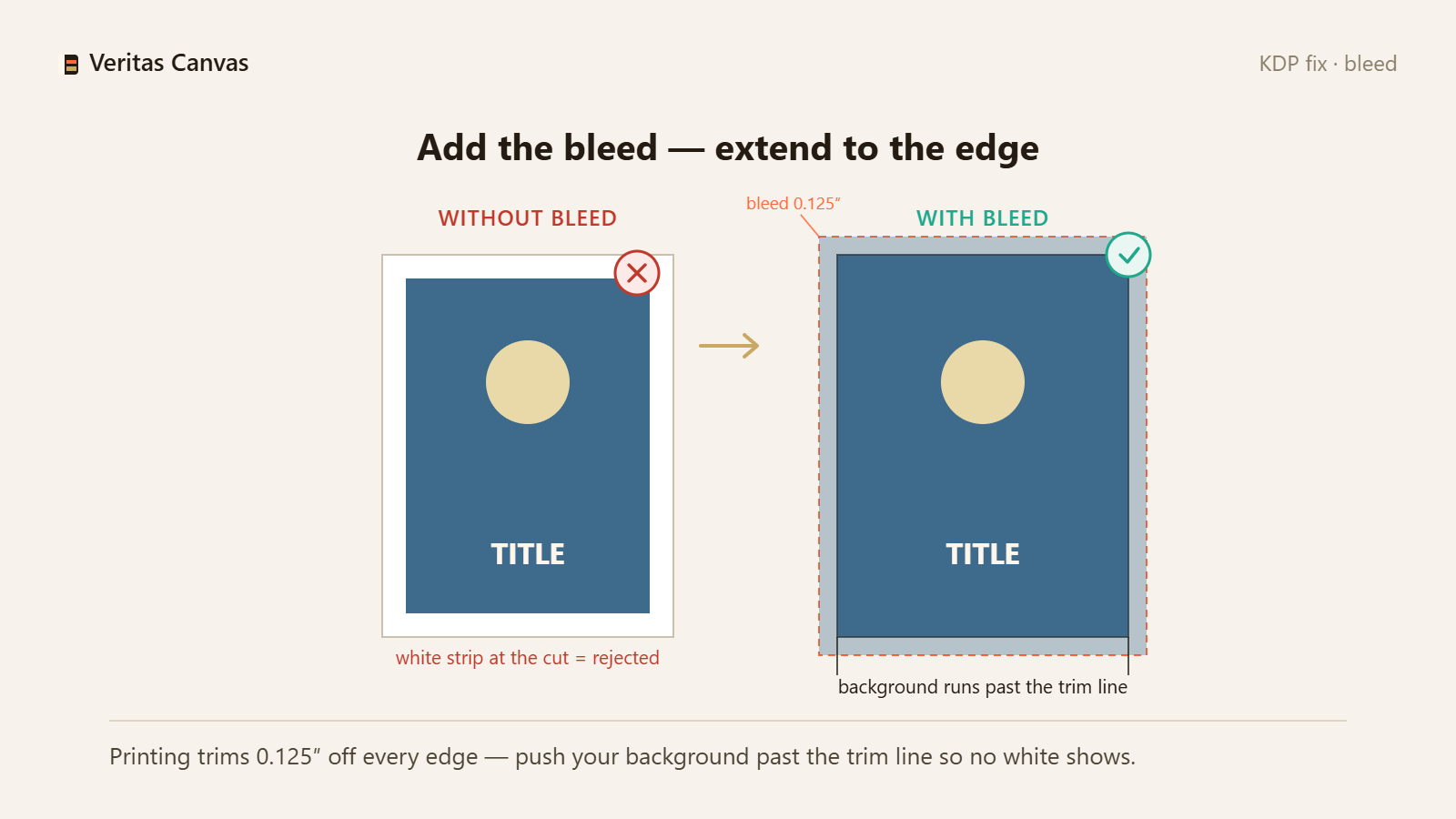
1. What bleed is and why KDP requires it
Bleed is extra image area beyond the final trim line. Printing and cutting have tiny tolerances, so KDP requires 0.125 in (3.2 mm) of bleed on each outer edge. Without it, a slight cut variance leaves a thin white strip at the edge. Fix: build the cover at trim size plus 0.125 in bleed on the outer edges.
2. Which edges get bleed — not the spine
On a full-wrap print cover, bleed goes on the top, bottom and the two outer (left and right) edges. The spine is interior to the wrap, so it gets no bleed. Fix: extend the background past the top, bottom and outer edges; leave the spine as designed.
3. Extend your background into the bleed
The most common bleed rejection is a background that stops at the trim line, leaving white at the edge after cutting. Any color, photo or texture that reaches an edge must run all the way to the bleed line. Fix: pull the background out past the trim, into the full bleed area.
4. Keep text and faces in the safe zone
Because the outer 0.125 in is trimmed and cutting varies slightly, keep titles, author names and faces at least 0.25 in inside the trim — the safe zone. Anything closer risks being cut. Fix: pull important elements inward, away from the edges.
5. How bleed changes your pixel size
Bleed adds to your file dimensions. A 6×9 front cover becomes 6.25×9.25 in with bleed, which is 1838×2775 px at 300 DPI. Fix: export at the bleed-inclusive size, 300 DPI, so KDP accepts it without resizing.
6. Confirm it in KDP's Print Previewer
After uploading, KDP's Print Previewer shows the trim line, bleed and safe zone. If your background reaches the bleed and your text sits inside the safe zone, the cover passes. Fix: check the previewer before you approve.
How much bleed does a KDP cover need?
0.125 in (3.2 mm) on every outer edge of a print cover. The background must extend fully into that bleed so trimming never leaves a white edge.
Does the spine need bleed?
No. Bleed applies only to the top, bottom and outer edges of a full-wrap cover. The spine is interior to the wrap and does not get bleed.
Why are there thin white lines on my printed cover?
Almost always missing bleed: the background stopped at the trim line instead of extending past it, so a slight cut variance exposed the white paper. Extend the background into the 0.125 in bleed.
Does Veritas Canvas add KDP bleed automatically?
Yes. It sets the correct 0.125 in bleed for your trim size and extends the design into it, then exports a print-ready 300 DPI file — free, no signup, no watermark.